One Agent for the Whole Company, in Teams

On October 8th, the first Teams group at Emlakjet could mention @Alp. That week, six people sent it 96 messages.
In the week of October 19th, 27 people sent it 1,240. This week is three days old and it has already passed 1,000 messages and the previous week’s agent runs. Three out of four of those messages come from closed rooms, most of them business teams: finance, listing operations, content, growth, HR and the team leads.
Nobody installed anything. They already had Teams open.
From a fleet to one
A month ago I wrote about putting agents into a team chat. That chat was a separate app, and the agents in it were a fleet: an architect, a product analyst, a marketing agent, a customer-service agent, each with its own Unix user and its own hand-cut set of permissions. It worked, up to a point. Two things kept showing up.
A second app is a second place. People who live in Teams all day had to remember to go somewhere else to ask a question. The review and QA agents still work there, inside the developer loop. Most of the company never opened it.
Every team meant a new agent. A new agent, a new Unix user, a new set of grants and a new prompt to maintain. The fleet grew one team at a time, and so did the work of running it, while the questions people asked crossed team lines all the time.
So we did the opposite. One agent, in the chat tool the whole company already had open, and permissions that follow the person instead of the agent. The agent is the coordinator of Alp, the task platform we run our own work on. In Teams it is just @Alp.
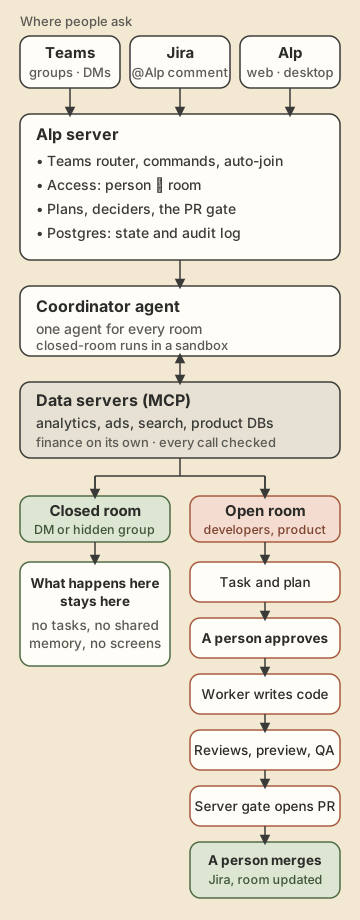
A personal agent quietly relies on three assumptions: it talks to one person, it uses that person’s access, and it may do anything that person asks. A shared agent breaks all three. Four problems came out of that, and each one got its own design.
1. Conversations: is this message for the agent?
In a direct message, every message is for the agent. In a group it is not that simple. Two people are talking about a campaign, one of them asks the agent for last week’s numbers, the agent answers, and the other writes “and the week before?” without tagging anyone. That question is for the agent. The next message, “let’s talk after lunch”, is not.
For the first two weeks the rule was simple: the agent answered when someone wrote @Alp and stayed out otherwise. It was safe, and every follow-up without a tag went unanswered.
Since October 21st, for 30 minutes after the agent’s last message in a group, an untagged message can still reach it. The server waits eight seconds to collect the whole burst instead of the first line, then a separate model call reads those messages with the six before them and decides whether they are meant for the agent. Below 0.8 confidence the agent stays out. “Alp sus” (“Alp, quiet”) turns this off for two hours, and after that only a tag gets a reply.
Each group also has its own memory of about 4,000 tokens that every run in that group reads. /memory shows it, /forget clears it, and no other group ever sees it.
Some things do not go to a model at all. /status, /answer, /memory, /forget and a few other commands are answered by the server directly, instantly. The emergency stop is handled the same way: @Alp dur (“Alp, stop”) stops all the Teams and Jira work the agent is doing and @Alp devam starts it again. Only people who can approve plans can use it, and the agent has to be named, so a “dur” in an ordinary sentence does nothing.
A typical answer takes about 75 seconds. One in ten takes more than seven minutes, mostly the ones that run heavy data queries.
2. Data: one set of connections, not everyone’s logins
A question like “how did last week’s campaigns do” or “which listings lost the most views” is only worth asking if the agent can actually read the numbers. A personal agent reaches data through its owner’s logins. When the owner leaves or a token expires, everything built on that login quietly stops.
We never connected a person’s login. The agent reads company data through a small number of data servers that speak MCP and are owned by us. One reads the analytics warehouse, the ad and search platforms and the product databases. Another sits in front of the finance system and serves only finance. They run under their own service users with read-only access, and every call goes through them.
This changes what a question costs. Before, a marketer who wanted a cut of the data that no dashboard showed wrote a request to an analyst and waited. Now they ask in their team’s room, the agent writes the query, runs it within that person’s grants, and answers with the numbers. The analysts have not gone anywhere; they get asked the harder questions, and they get asked them later, after the obvious ones have already been answered.
The data servers reload their permission file when it changes. Giving a new team access is an edit to one file and a command that lets the agent into their group. It takes minutes, and nothing on the agent’s side changes.
3. Permissions: the person, the room, and the code
When one agent can reach everything that has been connected, every request raises two questions: what is this person allowed to see, and what may this room hold?
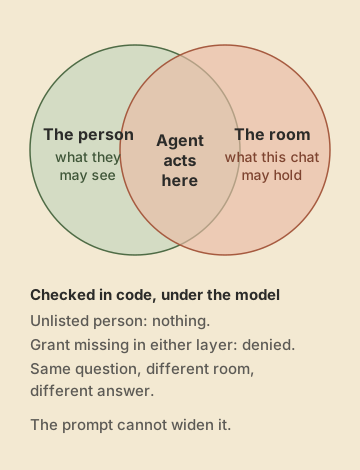
The answer is an intersection. Each person has a grant: which data sources, which tools, whether they may read code, whether they may trigger a build. Each group has a ceiling. In a group, the agent acts only where the person’s grant and the group’s ceiling overlap. A finance lead asking in the finance room gets finance numbers. The same person asking the same question in the team-leads room does not, because that room’s ceiling does not include finance. Someone who is not listed at all gets nothing, not a sensible default.
All of this lives in code, underneath the model. The prompt describes the rules so the agent can explain a refusal politely, but the prompt is not what enforces them. The data server checks every call against the grant before it runs. The server checks every write against the room before it lands. The model cannot be talked into a wider grant, because the model never holds the grant.
For a while the closed rooms also had an approval step for some tool calls, on top of the permission file. A question the file already allowed would stop and wait for that approval, and the person got no answer. I removed it. The permission file decides, and nothing sits on top of it.
The cost of rules in code is that a refusal does not explain itself. If someone is not in the file, or their grant does not cover the source they asked about, the agent refuses, correctly. But only a handful of people know the file exists, so the next message goes to me or to their manager, and the fix is me adding a line.
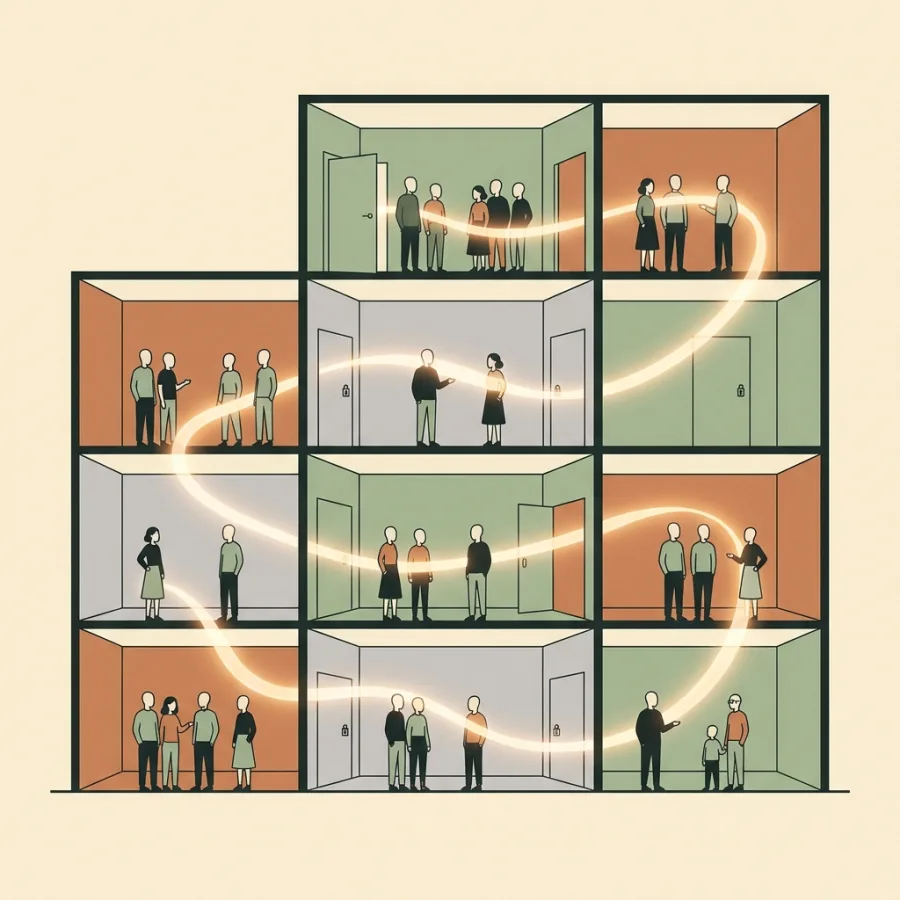
There are two kinds of rooms, and they behave differently on purpose.
Closed rooms are direct messages and hidden groups, most of them business teams. What happens in a closed room stays in it. There the agent answers, reads data within the person’s grant and writes back into that chat. It opens no tasks, writes no shared memory, and nothing from there shows up on a shared screen. If someone wants to take a topic from their own direct messages into a group, they ask for it in the group, and only their own topic comes along; any data in it is queried again under the group’s ceiling.
Open rooms are where the developers and product people are. There the agent does everything it does in Alp: it opens tasks, writes plans, starts work, comments on Jira, and posts updates back.
That split was not in the first design. It came out of watching how people used the agent in the first two weeks: the business teams wanted an analyst they could talk to freely, and the engineering teams wanted a colleague who could take a task all the way to a pull request.
Same agent, different team
The agent is the same in every room. What it can reach is not, and neither is what people ask it. Counting which data tools it called in each group over three weeks gives a clear picture of each team.
Management office. The widest room and the busiest one, with 514 data calls: the sales and contract system, the product database, finance, the data warehouse, web analytics and the search index.
Growth. Mostly the data warehouse and the CRM messaging platform, to see how messaging campaigns performed, with web analytics next to it.
Traffic. Ad platforms, web analytics, Search Console’s URL inspection and the website’s request logs: where visitors come from and how pages do in search.
Listing operations and portfolio management. The product database and the sales and contract system: listings, offices and contracts.
Finance. The sales and contract system plus the finance server. Only three rooms can reach finance data at all: the two finance rooms and the management office.
Team leads. Sales, product and warehouse data, and no access to code.
Content planning and SEO. The warehouse and Search Console, and for SEO also field performance data from real Chrome users. The SEO room can trigger a build too.
Funnel. Web analytics, with the central bank’s macroeconomic series next to it.
Developers. The open rooms look different again: Jira, Jenkins, pull request and code search, and the product database’s schema. Some developer rooms may read only the product database and no other data.
None of this is in the prompt. It comes from each room’s ceiling in the permission file: which sources it may reach and whether it may read code or trigger a build. Five of the closed rooms can read data and nothing else.
4. Orchestration: one coordinator, many workers
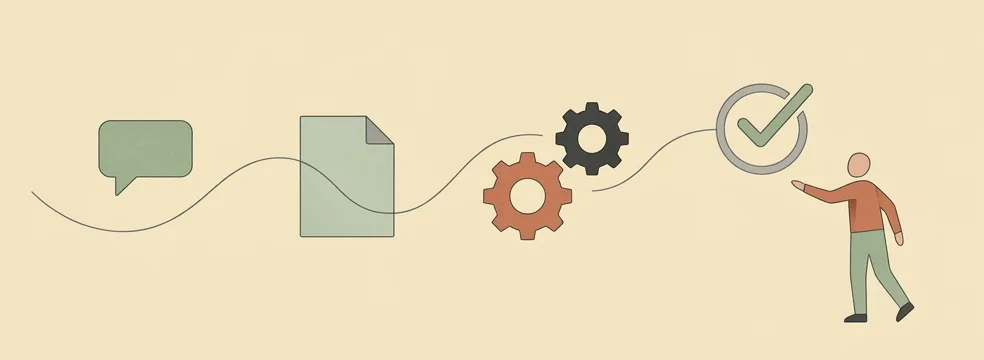
In an open room, a request can become code, and the person asking does not need to know where the code lives.
The coordinator is the agent people talk to. It does not write code and it never merges. Its job is to understand the request, write the plan, hand the work out and keep track of it. The code is written by worker agents: build workers on Claude Code and Codex, two reviewers on different models, and QA agents, one of them kept for risky changes. They run on shared machines, so a request from Teams does not depend on anyone’s laptop being open.
- Someone describes what they need in their own words in a group.
- The agent opens a task, writes a plan with acceptance criteria and posts it back as a reply.
- A person with the right to approve answers “onay” (“approved”), “go ahead” or anything similar. A small classifier reads the reply. Nothing is built before this.
- A worker agent writes the code, runs the local checks, pushes a branch and asks for a branch build, which runs in the name of the person who approved.
- Two reviews run, from two different reviewer agents on two different models, and a preview environment is tested against the acceptance criteria.
- The server opens a pull request only when the local checks, the preview checks and both clean reviews refer to the same commit. The agent cannot open one on its own.
- A QA agent tests the result. The Jira task moves through its columns by itself.
- A person merges. Always.
The coordinator and the workers do not report to each other in free text. A worker ends each step with one line the server can read, such as LOCAL CHECKS: PASS · head 3f2a… or VERDICT: clean · head 3f2a…, naming the commit it refers to. The server reads those lines, wakes the coordinator, and decides by itself whether the pull request gate is met. The coordinator cannot claim that the checks passed; the lines either say so for that commit or they do not.
Most of the coordinator’s work is handling what goes wrong. A red build goes back to the worker twice, then to a person. Two rounds of review findings in a row go to a person. An environment failure is retried after 10, 30 and 60 minutes, on another machine if one is free, and the room gets one plain sentence instead of a stack trace. When a worker hits its plan limit, the work moves to the next free one. Every new commit starts the reviews, the preview and QA again.
Work that comes from Teams or Jira runs on shared workers for the whole chain, because the company asked for it; work a person starts from their own Alp screen runs on their own machines.
In our busiest workspace the coordinator ran 1,352 times in the last two weeks. In three weeks, 21 tasks were opened from Teams conversations and 7 have reached a pull request. Most of what people want from the agent is an answer, not a code change.
The bottleneck moved to people
Once the agent could plan, build, review and test, the slowest step in almost every piece of work became a person.
On October 25th we looked at the last 30 days: of 22 pieces of work the agent was coordinating, 13 to 15 were waiting on a human step. A plan to approve, a manual test, an environment to prepare, a release decision. The agent was escalating correctly; nobody was reading the escalations. Its inbox for “this needs you” had 291 items, and 3 of them had been opened. About 245 of those came from one kind of broadcast that went to every administrator, me included, when work stalled. We learned to ignore it.
The fix was to stop broadcasting. Every waiting step now has a deciding person. By default it is whoever asked; a person named on the task wins; and the requester or the current decider can hand it on to someone else. The decider gets a mention in the Teams room and on the Jira task where the work started, and a short list of their open decisions every morning, instead of one more line in an inbox.
Three weeks in numbers
| Week of | User messages | People |
|---|---|---|
| October 5 | 96 | 6 |
| October 12 | 138 | 8 |
| October 19 | 1,240 | 27 |
| October 26 (3 days) | 1,006 | 26 |
Altogether: 38 people, 32 rooms (24 groups and 8 direct conversations), 2,480 messages.
Twenty-six people use closed rooms and 14 use open ones. The first seven rooms, opened from October 8th, were open groups. Direct conversations and the first closed rooms opened on October 20th, and that is the jump. The developers came first; the rest of the company came faster.
What I do not have yet is a good measure of value. Message counts show that people come back; they do not show that the answers were right or that the decisions were better. That is the next thing to measure, and it has to be measured against the source data, not by asking the agent how it did.
Today
One agent, 32 rooms, two data servers and one permission file. Finance asks it about numbers; developers give it tasks and get pull requests back, which a person merges. I add people and groups to the permission file and go through the morning list of decisions waiting on me.
Three things are open. It speaks when spoken to, and for 30 minutes after its own last message; I have not decided whether it should ever join a conversation nobody invited it into. We measure how much people use it, not whether the answers are right, and that is the next thing to measure. And most work still waits on a person: fewer broadcasts helped, but they did not make anyone faster at deciding.